A SwiftUI Surprise: Why Your View Reloads Even When Nothing Changes
How @Observable's unconditional change notifications trigger ghost UI updates — and what you can do about it.

Swift version used: Apple Swift 6.2.3 (swiftlang-6.2.3.3.21, clang-1700.6.3.2), Target: x86_64-apple-macosx26.0 iOS 26.2.
The behavior described in this post was observed and verified on the Swift version above. Since @Observable's macro expansion and ObservationRegistrar internals may change in future Swift releases, results may vary on later versions.
The Setup
You're building a SwiftUI app with the shiny @Observable macro. You have a view model with an optional UserData:
import Observation

@Observable
class ViewModel {

    struct UserData {
        var emails: [String] = []
    }

    var userData: UserData?

    func addEmail() {
        userData?.emails.append(randomEmail())
    }

    func setUser() {
        userData = UserData()
    }
}
And a view that uses it:
struct ContentView: View {
    @State private var vm = ViewModel()

    var body: some View {
        VStack {
            Button("Add Email") { vm.addEmail() }
            Button("Configure User") { vm.setUser() }

            EmailList(emails: vm.userData?.emails)

            // This random number helps us detect re-renders
            Text(Int.random(in: 0...100).description)
        }
    }
}
Simple enough. The user must tap "Configure User" first (to set userData), then "Add Email" to append emails.
The Gotcha
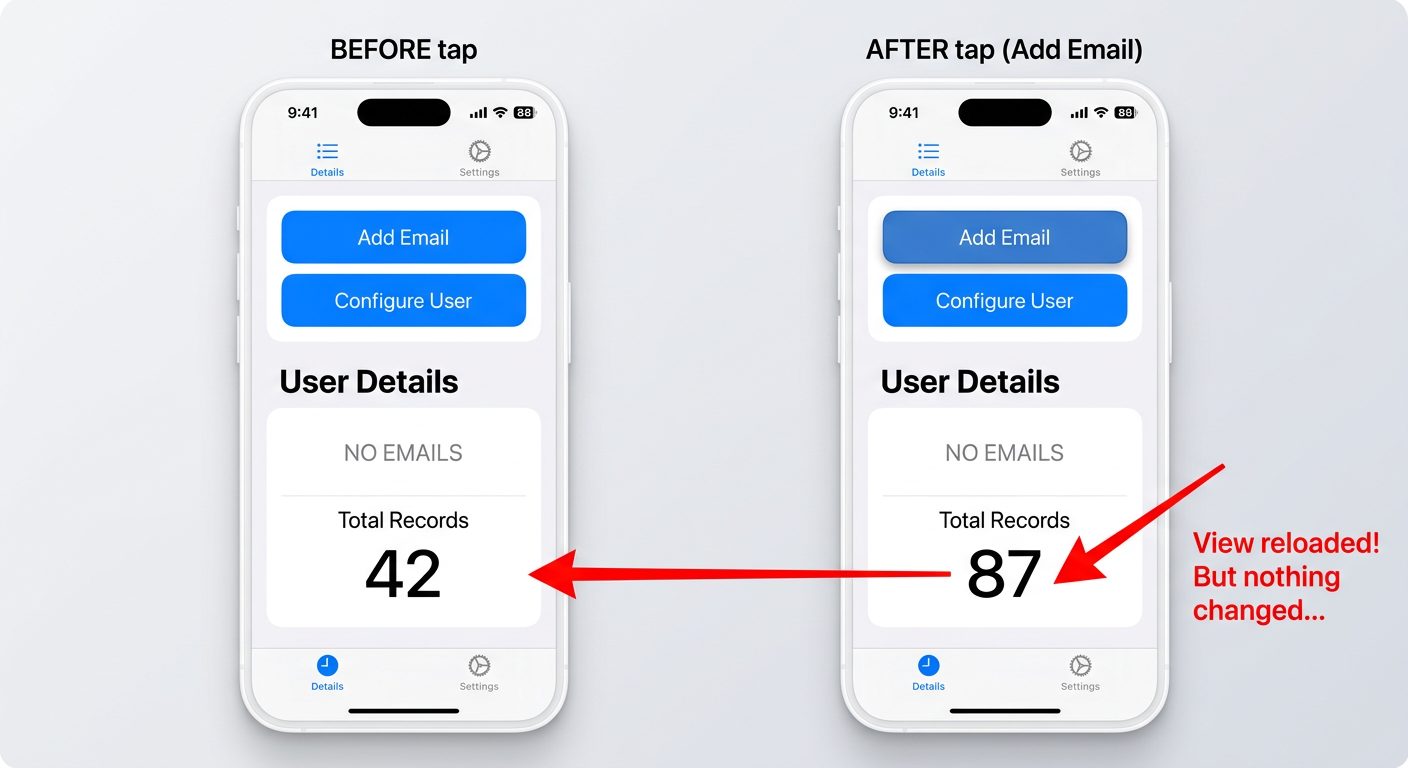
Here's the question: What happens when you tap "Add Email" before configuring the user?
userData is nil. The optional chain userData?.emails.append(...) should short-circuit. Nothing should change. The view should not reload.
But it does.
The random number changes. body is re-evaluated. SwiftUI does work for absolutely no reason.
Why? Two Concepts You Need to Know
To understand this gotcha, you need two puzzle pieces:
Piece 1: Swift's _modify Accessor
Every stored property in Swift doesn't just have get and set. There's a third accessor: _modify. When you mutate through a property (e.g., obj.value.append(item), obj.value += 1, or someFunc(&obj.value)), the compiler uses _modify instead of set to allow in-place mutation without copying.
_modify is a coroutine — it yields a mutable pointer to the value, pauses while the caller mutates through it, and resumes for cleanup when the caller is done.
For a deeper dive into _modify, how it works, when the compiler chooses it over set, and how it appears in SIL, checkout my blog post on Swift's Secret where _modify Accessor
The important thing to know here: _modify hands out a pointer before the caller does anything with it. It has no way of knowing whether the caller will actually change the value or not.
Piece 2: What @Observable Does with Change Notifications
Here's the real cause. The @Observable macro wraps property accessors with change notifications via ObservationRegistrar:
// What @Observable generates for: var userData: UserData?

@ObservationTracked
var userData: UserData? {

    @storageRestrictions(initializes: _userData)
    init(initialValue) {
      _userData = initialValue
    }

    get {
        access(keyPath: \.userData)
        return _userData
    }
    set {
        guard shouldNotifyObservers(_userData, newValue) else {
            _userData = newValue
            return
        }
        withMutation(keyPath: \.userData) {
            _userData = newValue
        }
    }
    _modify {
        access(keyPath: \.userData)
        _$observationRegistrar.willSet(self, keyPath: \.userData)
        defer {
            _$observationRegistrar.didSet(self, keyPath: \.userData)
        }
        yield &_userData  //  pause — caller may or may not mutate
    }
}

@ObservationIgnored
private  var _userData: UserData? /// backing storage
Notice the critical difference:
sethas aguard shouldNotifyObservers— it can compare old vs new before deciding to notify._modifyhasObservationRegistrar.willSetbefore yielding andObservationRegistrar.didSetafter — unconditionally. The registrar fires notifications regardless of whether the caller actually changes anything through the pointer.
The issue isn't _modify itself — _modify on a plain property (without @Observable) would be harmless. The issue is that @Observable's ObservationRegistrar unconditionally fires change notifications around the yield, with no way to check whether the value actually changed.
Putting It All Together
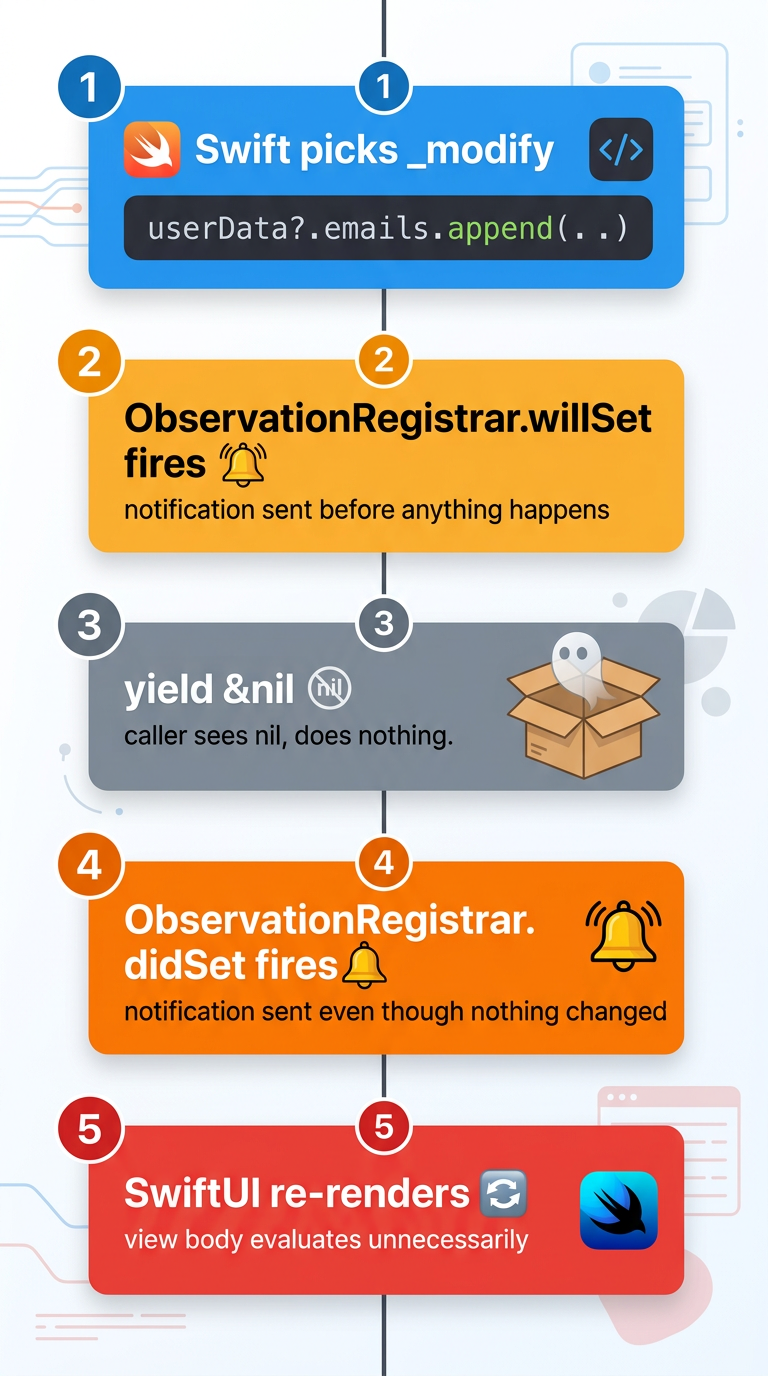
Now let's trace what happens when you call addEmail() with userData being nil:
func addEmail() {
    userData?.emails.append(randomEmail())
}
Step-by-step execution:
1. Swift sees .append() — a mutation through `userData`
   → Chooses _modify accessor (not set)

2. Enters @Observable's _modify on `userData`:
   → ObservationRegistrar.willSet(...)       🔔 FIRES unconditionally!
   → yield &_userData                        ⏸️ hands out pointer to nil

3. Caller receives &_userData (which holds nil):
   → Optional chaining: nil?.emails.append(...)
   → Short-circuits. Does nothing.

4. Returns to _modify:
   → ObservationRegistrar.didSet(...)        🔔 FIRES unconditionally!

5. SwiftUI sees change notifications were sent:
   → Schedules view re-evaluation
   → body runs again
   → Random number changes
   → User sees a "reload" even though nothing changed
The root cause: ObservationRegistrar fires willSet/didSet unconditionally inside _modify. It has no mechanism to compare values before and after the yield — so it always assumes a change occurred.
Proof: Looking at the SIL
Don't take my word for it. We can see exactly what the compiler generates. Swift Intermediate Language (SIL) is the compiler's internal representation, one level below Swift source code.
swiftc -emit-sil YourFile.swift
Here's the addEmail() function in SIL (simplified):
sil @ViewModel.addEmail() {
  // Step 1: Enter _modify on userData
  %2 = class_method %0, #ViewModel.userData!modify
  (%3, %4) = begin_apply %2(%0)     // ← enters _modify, gets &_userData

  // Step 2: Check if optional is nil (AFTER begin_apply!)
  switch_enum %3
    case .some → bb1            // has value → mutate
    case .none → bb3            // nil → skip

bb1:                            // non-nil path
  // ... append email ...

bb3:                            // nil path — does nothing
  end_apply %4                  // ← exits _modify, didSet fires anyway
}
The critical detail: begin_apply (which enters _modify and triggers ObservationRegistrar.willSet) happens before the switch_enum (the nil check). By the time Swift knows the value is nil, the change notification has already been sent.
The Fix
Surprisingly simple. Don't let @Observable's notification-wrapped _modify be entered when there's nothing to modify:
func addEmail() {
    // ✅ Check BEFORE touching the property with a mutation
    guard userData != nil else { return }
    userData?.emails.append(randomEmail())
}
The guard only uses get (reading userData to check nil), which does not trigger change notifications. If it's nil, we bail before _modify is ever entered — meaning ObservationRegistrar.willSet/didSet never fire.
When Does This Matter?
This isn't just an academic curiosity. It has real performance implications:
Unnecessary view re-renders — SwiftUI re-evaluates
body, diffs the view tree, and potentially re-draws UI. Multiply this by rapid user interactions and you have wasted CPU cycles.Cascading updates — If your view passes data to child views, those children also re-evaluate. A single ghost notification can cascade through your entire view hierarchy.
List performance — In a
ListorForEachwith many items, unnecessary re-renders can cause visible stuttering.
But What About @State? And ObservedObject?
Here's where it gets even more interesting. We tested the exact same pattern using @State with a struct (no @Observable) and ObservedObject with @Published:
@State with a struct
struct TestView: View {
    @State var userData: UserData?  // plain struct, no @Observable

    func addEmail() {
        userData?.emails.append(randomEmail())
    }

    var body: some View {
        // ...
        Text(Int.random(in: 0...100).description)
    }
}
Result: Tapping "Add Email" when userData is nil → no reload. The random number does not change.
We also tested additional edge cases with @State:
| Action | userData state |
Reloads? |
|---|---|---|
userData?.emails.append(...) |
nil | No |
userData = nil (already nil) |
nil | No |
count += 0 (no value change) |
non-nil | No |
nonEquatableData.value += 0 |
non-nil, type is not Equatable |
No |
@State does not trigger a reload in any of these cases — even for non-Equatable types where no == operator exists.
ObservedObject with @Published
The same ghost reload behavior that affects @Observable also affects ObservedObject with @Published properties. Optional chaining with mutation on a @Published property fires objectWillChange regardless of whether the value actually changed.
What does this tell us?
@State appears to be performing additional checks before invalidating the view — possibly comparing the stored value before and after the mutation at a memory level. Since it avoids reloads even for non-Equatable types, it's not using the == operator. The exact mechanism is internal to SwiftUI and not publicly documented.
@Observable and ObservedObject/@Published, on the other hand, fire their change notifications unconditionally when _modify is used — ObservationRegistrar.willSet/didSet and objectWillChange.send() respectively — without any post-mutation comparison. This is a deliberate design choice: both are general-purpose observation mechanisms where subscribers might need to prepare for changes ahead of time.
We cannot say definitively how @State avoids this problem, since its implementation is private. But the observable behavior is clear: @State handles this edge case gracefully, while @Observable and ObservedObject do not. This is worth keeping in mind when choosing between using @State with a struct versus @Observable with a class for view-local state.
The General Rule
Any time you write optional chaining with a mutation on an @Observable property, you risk ghost reloads — because ObservationRegistrar fires change notifications unconditionally inside _modify:
// ⚠️ All of these enter _modify (and fire ObservationRegistrar) even if the optional is nil:
userData?.emails.append(newEmail)
userData?.name = "New Name"
userData?.count += 1
swap(&userData!.a, &userData!.b)

// ✅ Safe alternatives:
guard userData != nil else { return }
userData?.emails.append(newEmail)

// Or restructure:
if var data = userData {
    data.emails.append(newEmail)
    userData = data  // uses set, which has the guard
}
Key Takeaways
| What | Why |
|---|---|
get |
Returns a copy. No notifications. |
set |
Replaces value. Can compare old vs new before notifying. |
_modify |
Yields pointer. ObservationRegistrar notifies unconditionally. |
| Optional chaining + mutation | Enters _modify (and fires notifications) before the nil check. |
| The fix | Guard against nil before the mutation expression. |
Further Reading
SE-0395: Observation — The Swift Evolution proposal for
@ObservableSwift SIL Documentation — Understanding Swift Intermediate Language
swiftc -dump-ast,swiftc -emit-silgen,swiftc -emit-sil— Your tools for peeking under the hood
If you found this interesting, subscribe for more deep dives into Swift and SwiftUI internals. Drop a comment if you've been bitten by this behavior — I'd love to hear your war stories.
Appendix: Full Reproducible Code
Drop this into a fresh SwiftUI project to see the issue yourself:
import SwiftUI
import Observation

// MARK: - View Model

@Observable
class ViewModel {

    struct UserData {
        var emails: [String] = []
    }

    var userData: UserData?

    func addEmail() {
        // ⚠️ This triggers a view reload even when userData is nil!
        userData?.emails.append(randomEmail())
    }

    func addEmailSafe() {
        // ✅ This does NOT trigger a reload when userData is nil
        guard userData != nil else { return }
        userData?.emails.append(randomEmail())
    }

    func setUser() {
        userData = UserData()
    }
}

// MARK: - Views

struct ContentView: View {
    @State private var vm = ViewModel()

    var body: some View {
        let _ = print("body evaluated") // Watch the console!

        VStack(spacing: 16) {

            Button("Add Email (Ghost Reload)") { vm.addEmail() }
                .buttonStyle(.borderedProminent)
                .tint(.red)

            Button("Add Email (Safe)") { vm.addEmailSafe() }
                .buttonStyle(.borderedProminent)
                .tint(.green)

            Button("Configure User") { vm.setUser() }
                .buttonStyle(.bordered)

            EmailList(emails: vm.userData?.emails)

            // Random number to detect re-renders
            Text("Render ID: \(Int.random(in: 0...999))")
                .font(.caption)
                .foregroundStyle(.secondary)
        }
        .padding()
    }
}

struct EmailList: View {
    let emails: [String]

    init(emails: [String]?) {
        self.emails = emails ?? ["(No user configured)"]
    }

    var body: some View {
        ForEach(emails, id: \.self) { email in
            Text(email)
                .font(.body.monospaced())
        }
    }
}

// MARK: - Helper

func randomEmail() -> String {
    let letters = "abcdefghijklmnopqrstuvwxyz"
    let name = String((0..<Int.random(in: 5...10)).map { _ in letters.randomElement()! })
    let domain = String((0..<Int.random(in: 4...8)).map { _ in letters.randomElement()! })
    let tld = ["com", "net", "org", "io", "dev"].randomElement()!
    return "\(name)@\(domain).\(tld)"
}
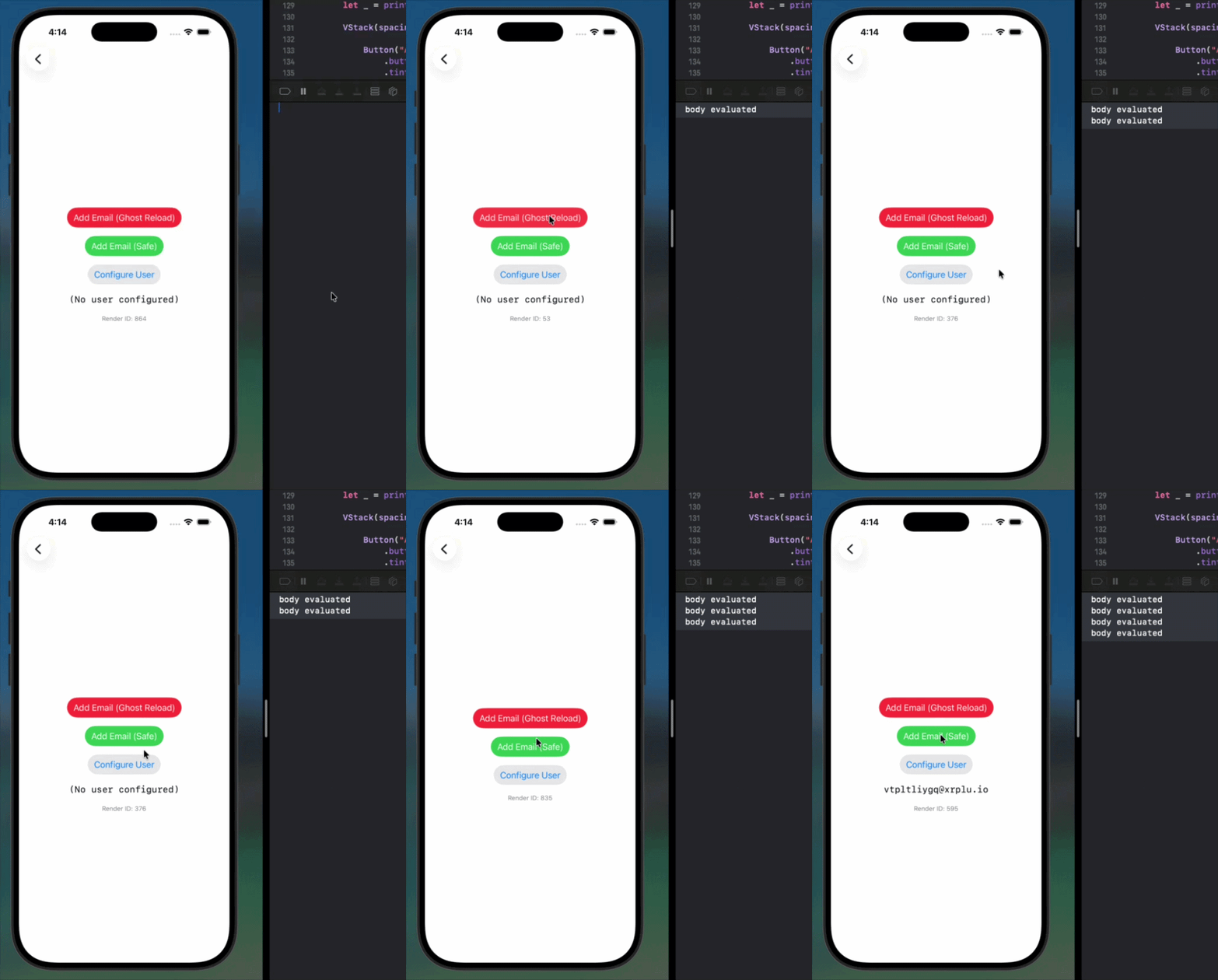
Test steps:
Run the app
Tap "Add Email (Ghost reload)" without configuring user → watch the Render ID change (ghost reload!)
Tap "Add Email (Safe)" without configuring user → Render ID stays the same (no reload!)
Tap "Configure User", then both buttons work correctly
Comments
Join the discussionNo comments yet. Be the first to comment.
